LorePort for Statamic

Newsletter signup forms for authors, connected to LorePort.
-
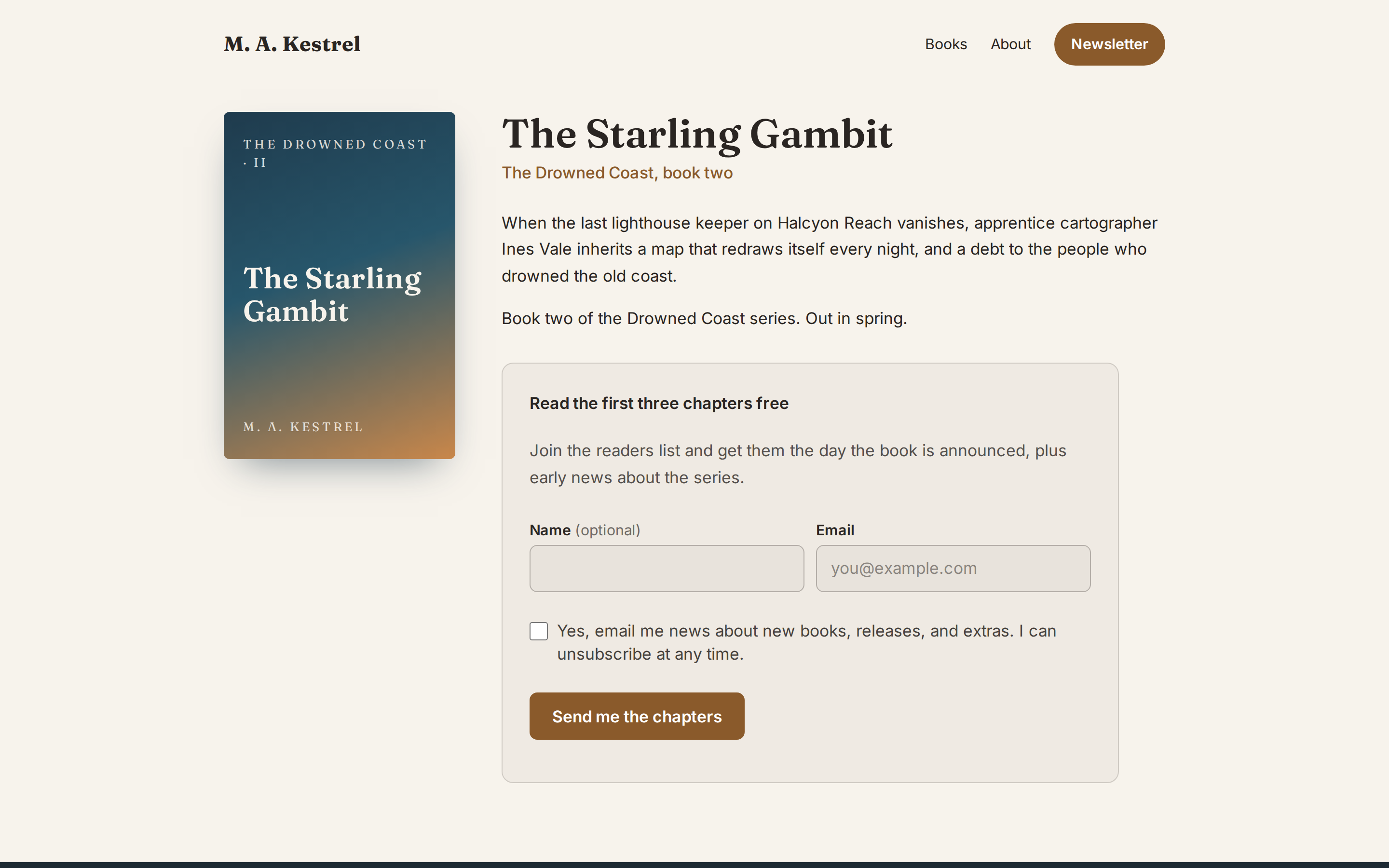
A signup form tag:
{{ loreport:form }}, in a card or plain look, stacked or on one line, matching your site's fonts and colours. -
Forms in your content: a "LorePort signup form" set for Bard and Replicator fields, so editors can place a form in a page without touching templates.
-
A "LorePort list" field for blueprints, so each book or series page can sign readers up to its own list.
-
Tags: tag readers by where they signed up (a book page, the footer, the contact form), for segments in LorePort.
-
Statamic forms: add a "subscribe" checkbox to any form (a contact form, say). People who tick it are signed up; people who don't, never are.
-
A popup:
{{ loreport:popup }}once in your layout, opened by any button ({{ loreport:popup_button }}, or your own withdata-loreport-open), and optionally on its own after a delay. -
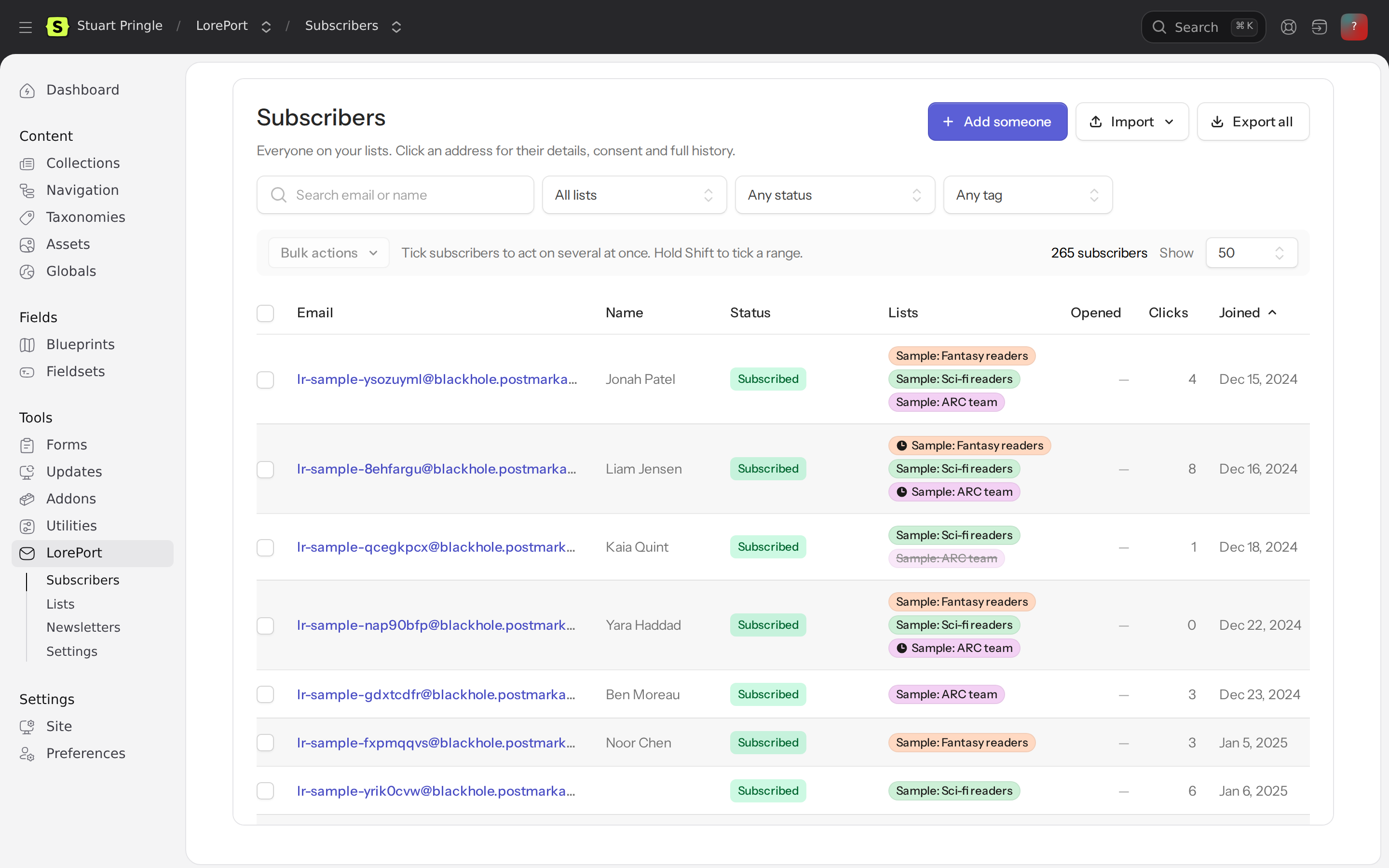
LorePort in the control panel: your Subscribers, Lists and Newsletters (writing, sections, layouts, scheduling and results) are LorePort's own pages, shown in Statamic's control panel, so they're always the same as in LorePort. Plus a Settings page explaining forms and the popup, and a dashboard widget with the newest subscribers.
-
Multi-site and languages: a default list per site, and readers' text in their site's language (French included).
Signups go to LorePort the same way its own forms do: double opt-in where the list uses it, and a consent record with the reader's IP address, browser and the wording they agreed to. If LorePort can't be reached, signups wait on your site and are retried for up to a week.
Requires Statamic 6 (Laravel 12 or 13) and PHP 8.2 or newer (8.3 with Laravel 13). Works in Antlers and Blade templates. Free; MIT licence.
Install
composer require loreport/statamic
In LorePort, go to Settings → API and webhooks and create a key with the lists:read and signups:write permissions. Add "Show Subscribers, Lists and Newsletters inside your website" (and this site's address on the key) to manage everything from the control panel, and subscribers:read for the dashboard widget. Then add the key to your site's .env:
LOREPORT_API_KEY=lp_...
Or paste it into Tools → LorePort → Settings → Connect: it's checked with LorePort and stored encrypted under storage/ (a key in .env always wins). Either way the key stays on your server. It isn't stored in the addon settings, which Statamic saves to a file that is usually committed to git.
To connect the site to a different LorePort account or pen name, use Disconnect on the same page: it revokes the key in LorePort (unless you untick that), and forgets the key, the list choices in Settings and any signups still waiting to be sent. A key in .env is disconnected by removing it there.
Then, in the control panel, open Addons → LorePort → Settings and choose a default list.
The signup form
{{ loreport:form }}
| Parameter | |
|---|---|
list |
A list ID, or a LorePort list field: :list="newsletter_list". Defaults to the list in Settings. |
title |
A heading above the form. |
description |
A line under the heading. |
button |
The button text. Default "Subscribe". |
name |
false to ask for the email address only. |
layout |
stacked (default) or inline: email and button on one line, stacking on phones. |
style |
card (default, a soft panel) or plain (just the fields, for footers and sidebars). |
tags |
LorePort tags for readers who sign up here: tags="Starling Gambit page, Website", or a Taggable field: :tags="newsletter_tags". See Tags. |
class |
Extra CSS classes. |
assets |
false to leave out the addon's stylesheet and script, if you style the form yourself. |
{{ loreport:form
    title="Get the next chapter first"
    description="New books, early chapters and the occasional giveaway."
    layout="inline"
    name="false"
}}
Readers tick an unticked consent checkbox showing the list's consent statement from LorePort (or a plain one if the list has none); the form isn't sent without it. The form works without JavaScript. With it, the form is sent in the background and the answer appears in place.
Styling
The form takes its fonts and text colour from your site, and every rule has zero specificity (:where()), so your own CSS always wins. To adjust it, set these on .loreport-signup (or any parent):
.loreport-signup {
    --loreport-accent: #7c3aed;       /* button and focus ring */
    --loreport-accent-text: #fff;     /* text on the button */
    --loreport-radius: 16px;          /* the card's corners */
    --loreport-field-radius: 999px;   /* fields and button: pill-shaped */
}
Your own markup
As a tag pair, loreport:form gives your markup what it needs:
{{ loreport:form list="LIST_ID" }}
    <form method="post" action="{{ action }}">
        {{ fields }}
        <label>Email <input type="email" name="{{ email_field }}" required></label>
        <label>Name <input type="text" name="{{ name_field }}"></label>
        <button>Join</button>
        <label><input type="checkbox" name="{{ consent_field }}" value="1" required> {{ consent }}</label>
        {{ if message }}<p>{{ message }}</p>{{ /if }}
    </form>
{{ /loreport:form }}
{{ fields }} holds the hidden fields (the signed token and the spam trap): keep it inside the form. The consent checkbox is required: signups without it ticked are refused.
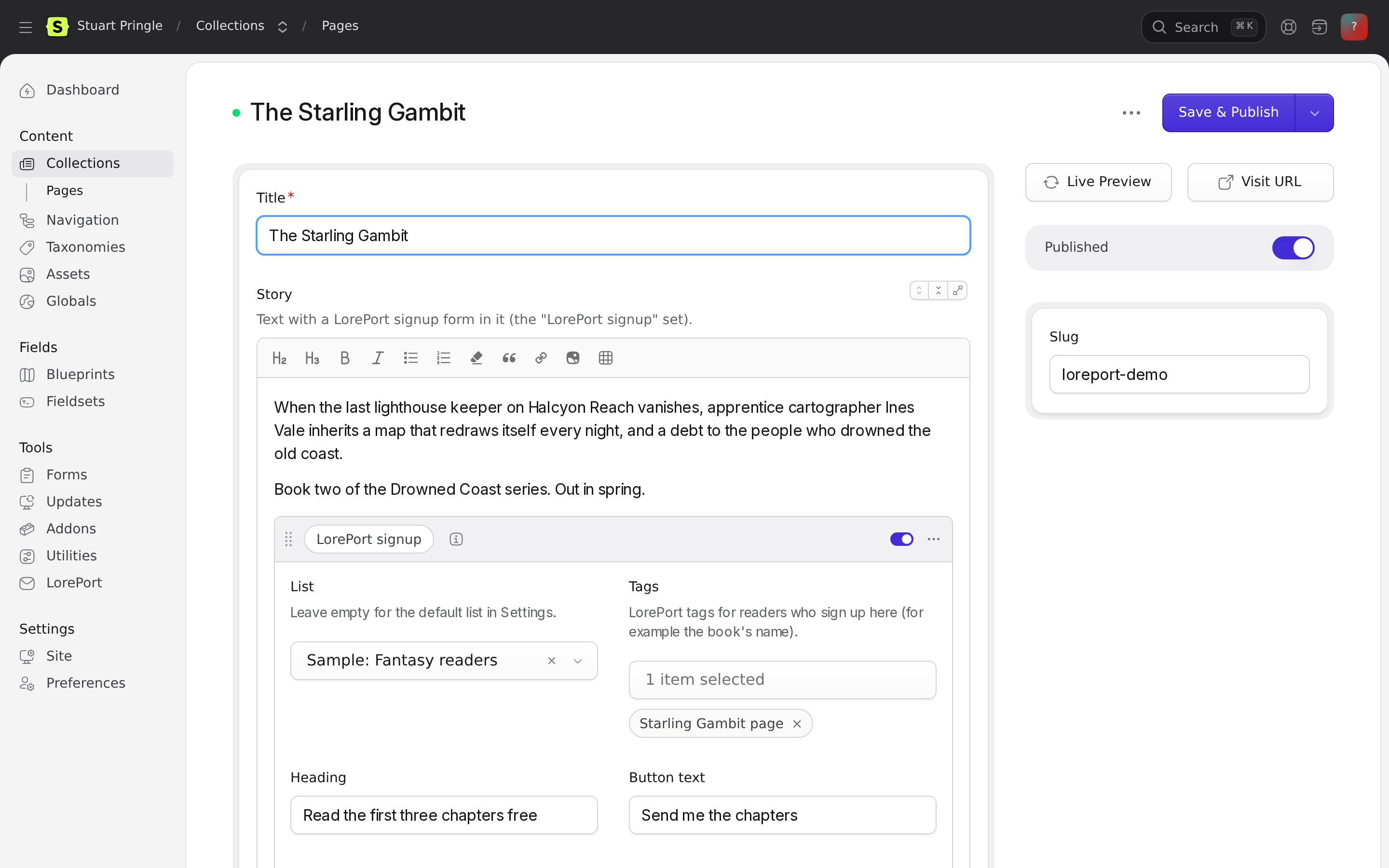
Forms in your content (Bard and Replicator)
Editors can place a signup form anywhere in a page's content:
- In the blueprint, edit your Bard or Replicator field and add a set (say, handle
signup, "LorePort signup"). - In the set's fields, import the fieldset LorePort signup form (
loreport::signup_form). It gives the set a list, tags, heading, description, button text, look, layout and "Ask for a name". - In your template, show the set with
{{ loreport:set }}inside the field's loop:
{{ content }}
    {{ if type == "text" }}
        {{ text }}
    {{ elseif type == "signup" }}
        {{ loreport:set }}
    {{ /if }}
{{ /content }}
If your sets each have a partial ({{ partial :src="'sets/'.type" }}), put {{ loreport:set }} in resources/views/sets/signup.antlers.html. Fields left empty use the defaults (the default list from Settings, a stacked card asking for a name). Parameters given to {{ loreport:set }} win over the set's fields.
A popup
Put the popup in your layout once (it takes the same parameters as loreport:form):
{{ loreport:popup title="Join the newsletter" description="New books first, and the occasional giveaway." }}
Then open it from anywhere:
{{ loreport:popup_button text="Get the newsletter" }}

{{# Or your own button or link: #}}
<button data-loreport-open class="my-button">Join the Signal</button>
<a href="#loreport-popup">Newsletter</a>
| Popup parameter | |
|---|---|
delay |
Seconds before it opens on its own (default from Settings → Popup, else 0: only from a button). Once someone closes it or signs up, it won't open on its own again for 30 days. |
id |
For more than one popup: id="books", opened with data-loreport-open="books". |
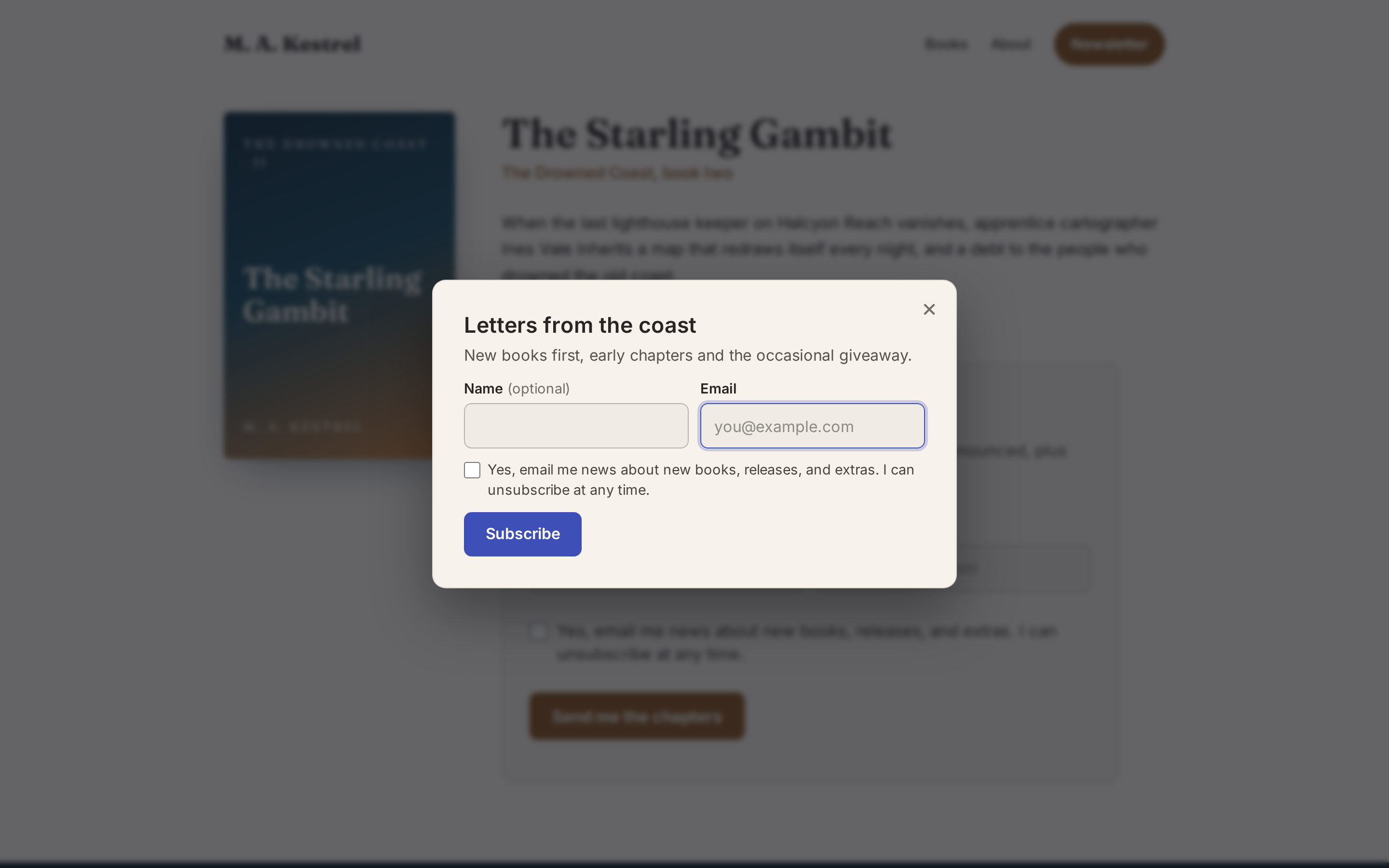
The popup closes with Escape, the close button or a click outside, keeps keyboard focus inside while open, and takes its background from your page (so it suits dark sites). To choose the background yourself: dialog.loreport-popup { --loreport-popup-bg: #111827; }.
loreport:popup_button takes text, class (your own classes replace the built-in look) and popup (which popup). As a pair, its content becomes the button's.
A list per entry
Add a LorePort list field to a blueprint (for example newsletter_list on your books), then:
{{ loreport:form :list="newsletter_list" }}
Entries without a list chosen use the default list.
Tags
Tags in LorePort say where a reader came from, so you can send to "everyone who signed up on the Starling Gambit page". New tags are created in LorePort the first time they're used.
- On a form or popup:
{{ loreport:form tags="Starling Gambit page" }}, or from a Taggable field on the entry:{{ loreport:form :tags="newsletter_tags" }}. - In a Bard or Replicator set: the set's Tags field.
- On a Statamic form: the Tags column in Addons → LorePort → Settings → Statamic forms.
- On every signup from the site: Tags for every signup in Settings (for example "Website"), added on top of the form's own.
Up to 10 per signup, 64 characters each. They travel inside the form's signed token, so readers can't change or add to them. Tags are added even when the reader is already subscribed, so someone who signs up on two book pages gets both.
Statamic forms
- Add a Checkboxes or Toggle field to the form, for example handle
subscribewith the option "Email me news about new books". - In Addons → LorePort → Settings → Statamic forms, add the form, choose its list, and enter the consent field's handle. If your fields aren't called
emailandname, enter their handles too (first_name, last_nameworks for the name). Add Tags to tag the people it signs up.
Only submissions with the box ticked are signed up, after Statamic's own validation and honeypot.
Blade
The tags work in Blade templates with Statamic's <s:...> syntax. Parameters starting with : take PHP values:
<s:loreport:form title="Get the next chapter first" layout="inline" :tags="['Starling Gambit page']" />
<s:loreport:form :list="$newsletter_list" :name="false" />

{{-- In the layout, once: --}}
<s:loreport:popup title="Join the newsletter" />
<s:loreport:popup_button text="Get the newsletter" />
The tag pair works too: <s:loreport:form list="LIST_ID"> ... </s:loreport:form>, with the variables listed under Your own markup.
Multi-site and languages
- A list per site: in Addons → LorePort → Settings → A default list per site, choose a list for any site (a French site, say). Forms on that site use it unless the tag names a list.
- Readers' language: the form, the popup and the answers readers see follow the site's language (
langinconfig/statamic/sites.php). The addon includes French. For other languages, or to change any wording, add the English text as keys to your site'slang/{language}.json, which wins over the addon's own:
{
    "Subscribe": "Abonneren",
    "You're subscribed. Thank you!": "Je bent aangemeld. Bedankt!"
}
The consent statement comes from the list in LorePort, so give each language's site its own list with its own wording. Headings and button text you set on a tag, a set or in Settings are used as written, so give each site's templates their own.
Spam and limits
Signup forms use a hidden honeypot field, a signed token that also spots bots posting within two seconds, and a limit of five signups per IP address in ten minutes (config/loreport.php). They don't use Laravel's CSRF token, which goes stale on statically cached pages, so the form works with full static caching.
When LorePort can't be reached
The reader is thanked and the signup is kept in storage/app/loreport/signup-queue.json, then retried with growing waits for up to a week:
- by the scheduler every five minutes (
php artisan schedule:runin cron), or by hand withphp please loreport:retry; - and, on sites without the scheduler, whenever the next signup goes through.
The control panel page shows how many are waiting.
Privacy
Signups send the reader's email address, name (if given), IP address and browser to LorePort to record their consent. Suggested privacy-policy wording:
When you sign up for our newsletter, your email address, name, IP address and browser are sent to LorePort, our newsletter service, to send you the newsletter and keep a record of your consent. If LorePort can't be reached at that moment, these details are kept on this website for up to a week until they can be sent.
Configuration
Publish the config file to change the defaults:
php artisan vendor:publish --tag=loreport-config
LOREPORT_API_KEY |
Your API key. |
LOREPORT_API_URL |
LorePort's address. Change it only to test against a development copy. |
timeout |
Seconds to wait for LorePort (8). |
signups_per_ip |
Signups per IP address in ten minutes (5). |
retry_days |
How long waiting signups are retried (7). |
The control panel
Tools → LorePort has:
- Subscribers, Lists, Newsletters: LorePort's own pages, shown in a frame. Everything you do in LorePort's back end works here, except pen names, plan, billing and sending setup (those open LorePort in a new tab). For these, the API key needs the "Show Subscribers, Lists and Newsletters inside your website" permission, and in LorePort (Settings → API and webhooks) the key's website must be this site's address: only that site can show the pages. Each time a page opens, the addon asks LorePort for a one-use sign-in link; in the frame you act as the person who created the key. If the frame's session ends (after a long idle spell), it signs in again by itself and reopens the same page.
- Settings: whether the connection works, how to add forms and the popup, and your list IDs.
For the dashboard widget, add it in config/statamic/cp.php:
'widgets' => [
    ['type' => 'loreport', 'width' => 50],   // 'count' => 5, 8 or 10 newest subscribers
],
Permissions
Super users see everything. For other roles, Use LorePort shows the LorePort pages and widget (in the frame they act in LorePort as the person who created the API key, so give it only to people who should manage your newsletter), and Edit LorePort settings allows changing the settings.
Developing
composer install
vendor/bin/phpunit
GitHub Actions runs the tests on PHP 8.2 to 8.5 with Laravel 12 and 13 on every push, and weekly to catch new Statamic and Laravel releases.